
Tourre Travel & Tour Agency Elementor Template Kit GPL v1.0
Original price was: 64.36$.3.28$Current price is: 3.28$.
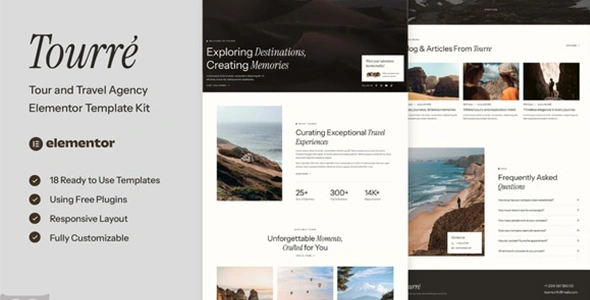
Tourre Template Kit GPL – Tourre – Travel & Tour Agency Elementor Template Kit (NOT A Wordpress Theme) is created especially for travel agencies, tour operators, and adventure booking services.
- Unlimited Website Usage – Personal & Clients
- Original GPL Product From the Developer
- Quick help through Email & Support Tickets
- Get Regular Updates For 1 Year
- Last Updated –
- Developer Live Preview
- Get this Product for Free in the Membership
Tourre Travel & Tour Agency Elementor Template Kit GPL Overview
Tourre – Travel & Tour Agency Elementor Template Kit (NOT A WordPress Theme) is created especially for travel agencies, tour operators, and adventure booking services. Tourre has a simple, modern and clean design with 100% responsive layout, and very easy to customize and can be used by anyone without having to understand coding.
This template kit includes 14 carefully crafted Pages and 18 stunning Templates, you can build your professional-looking website just a click away.
Features of Tourre Template Kit GPL
- Using Free Elementor (Elementor Pro is not required)
- Unique & Clean Design
- 14 Ready to Use Pages
- 18 Ready to Use Templates
- Fully Responsive Layout
- Fully Customizable
- Cross Browser Compatibility: Chrome, Firefox, Safari, Opera
Templates Include – Tourre Template Kit GPL
- Global Theme Style
- Home
- About
- Services
- Tours
- Tour Detail
- Destinations
- Testimonial
- FAQs
- Team
- Pricing
- Blog
- Single Post
- Contact
- 404 Page
- Header
- Footer
- Form Contact
- Form Newsletter
Required Plugin-Tourre Template Kit GPL
- Elementor
- ElementsKit Lite
- MetForm
- Gum Elementor Addon
How to Use Tourre Template Kits
THIS IS NOT a WordPress Theme. Template kits contain the design data for Elementor only and are installed using the Envato Elements plugin for WordPress or directly through Elementor.
- Download your kit file from Envato and do not unzip it. If you use Safari browser you may need to ensure “Open safe files after downloading” is disabled in the browser preferences.
- Go to Settings > Permalinks and ensure Post Name is selected
- Go to Appearance > Themes > Add New and ensure Hello Elementor is installed and activated. This will prompt you to install Elementor if you haven’t already.
- Go to Plugins and ensure Elementor and Envato Elements are installed and at the latest version. If your kit requires Elementor Pro, it must be installed now and connected to your account.
- Go to Elements > Installed Kits and click Upload Template Kit Zip (or click your kit to view it)
- Check for the orange banner at the top and click Install Requirements to load any plugins the kit uses. https://envato.d.pr/ughD8Q
- Click import on the Global Kit Styles first. This will setup the site settings.
- Click Import on one template at a time in the order shown. These are stored in Elementor under Templates > Saved Templates and are re-used from here.
Creating pages – Tourre Template Kit GPL
- Go to Pages and create a new page and click Edit with Elementor
- Click the gear icon at lower-left of the builder to view page settings and choose Elementor Full Width and hide page title
- Click the gray folder icon to access My Templates tab and then Import the page you’d like to customize.
- The home page is set under Settings > Reading by selecting Static Front Page.
How to Import Metforms – Tourre Template Kit GPL
If you have Elementor Pro, skip install of Metform and form blocks.
- Import the metform block templates
- Import the page template where the form appears and right-click to enable the Navigator
- Locate and select the Metform widget and click Edit Form. Choose
- New, then Edit Form. The builder will appear
- Click ‘Add Template’ grey folder icon.
- Click ‘My Templates’ tab.
- Choose your imported metform template, then click ‘Insert’ (click No for page settings).
- Once the template is loaded, make any desired customizations and
- click ‘Update & Close’ The form will appear in the template
- Click Update
Setup Global Header and Footer – Tourre Template Kit GPL
- Import the header and footer template
- Go to ElementsKit > Header Footer select Header and click Add New
- Give it a title, leave Entire Site selected and toggle Activation to On
- Click the template title and Edit Content
- Click the gray folder icon and select the header template to import and Update
- Repeat for Footer
If you have Elementor Pro, headers and footers are customized under Templates > Theme Builder.
Make Sure You Have Enabled ‘Flexbox Container’
- In the Dashboard go to Elementor > Settings > Features
- Go to ElementsKit > Header Footer select Header and click Add New
- Scroll down until you find ‘Flexbox Container’ > Active
Detailed Guide: Tourre Template Kit GPL
- https://youtube.com/playlist?list=PLeGaUeW2OthM3JPOmOoMWkIa_-e6Jpqxv&si=W4YiMZVc0EuyfLpj
- https://help.market.envato.com/hc/en-us/articles/900000842846-How-to-use-the-Envato-Elements-WordPress-Plugin-v2-0
| Brand | Theme Forest |
|---|---|
| License Type | GPL License |
| Activation | Pre-activated |
You must be logged in to post a review.
🔥 Black Friday Sale
Use the coupon code BLACK50 for an instant 50% discount on all items, including the Lifetime Membership.
The offer applies to all items, including Themes, Plugins, Membership Plans, Exclusive, and Lifetime Deals.
Offer valid till 30th November.
About Tourre Travel & Tour Agency Elementor Template Kit GPL
Tourre Travel & Tour Agency Elementor Template Kit GPL is listed under Elementor Kits on Real GPL. Files are original and unmodified; members receive updates for the period of their plan. Yes. Downloads from your membership can be used on unlimited personal and client websites.
- Product
- Tourre Travel & Tour Agency Elementor Template Kit GPL
- Version
- 1.0
- Category
- Elementor Kits
- License
- GPL (original files)
- Last updated
- May 1, 2026
Frequently asked questions
Is the Tourre Travel & Tour Agency Elementor Template Kit GPL download original?
Yes. Files are 100% original and unmodified, with no malware.
How do I get Tourre Travel & Tour Agency Elementor Template Kit GPL?
Choose a membership plan or the product option on this page, complete checkout, then download instantly from your account.
How often is Tourre Travel & Tour Agency Elementor Template Kit GPL updated?
Last updated on Real GPL: May 1, 2026. New versions are added as the developer releases them, and members receive updates for the period of their plan.
Can I use Tourre Travel & Tour Agency Elementor Template Kit GPL on more than one website?
Yes. Downloads from your membership can be used on unlimited personal and client websites.
Where can I get help with Tourre Travel & Tour Agency Elementor Template Kit GPL?
Our support team helps by email and support tickets.
More Elementor Kits
- Calvera Luxury Villa Retreat Elementor Template Kit
- FinanSiap Template Kit GPL – Financial Coach & Consulting Elementor Pro Template Kit
- Oxary Template Kit GPL – News & Magazine Elementor Template Kit
- Persova Template Kit GPL – Influencer Portfolio Elementor Template Kit
- Sirocco Desert Safari Tours Elementor Template Kit
- Tourvia Tour & Travel Booking Agency Elementor Template Kit
Get Original Lifetime & Exclusive Themes & Plugins Licenses
Premium original licenses for popular WordPress themes, plugins and website-building tools — available at exclusive prices.
Best Selling Original Licenses
Elementor Addons
Trending
And more fabulous deals — check the complete list of original licenses here

Reviews
Clear filtersThere are no reviews yet.