
Qtext AI Content Writer Elementor Template Kit GPL v1.0
Original price was: 64.36$.3.28$Current price is: 3.28$.
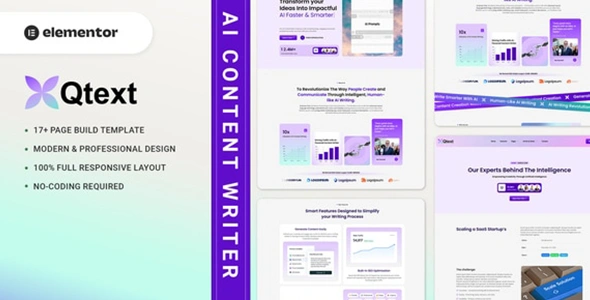
Qtext Template Kit GPL –Qtext is an Elementor Template Kit. built for AI Content Writer. This kit has a modern, creative and original design with a 100% fully responsive layout, easy installation, and sure very easy to customize because using Elementor so you don’t need a single line of coding!
- Unlimited Website Usage – Personal & Clients
- Original GPL Product From the Developer
- Quick help through Email & Support Tickets
- Get Regular Updates For 1 Year
- Last Updated –
- Developer Live Preview
- Get this Product for Free in the Membership
Qtext AI Content Writer Elementor Template Kit GPL Overview
Qtext is an Elementor Template Kit. built for AI Content Writer. This kit has a modern, creative and original design with a 100% fully responsive layout, easy installation, and sure very easy to customize because using Elementor so you don’t need a single line of coding! By installing this template kit, all the content shown in our demonstration, such as graphics, texts, and images, will be imported to your site.
This Template Kit contains page content for creating Elementor pages. This kit has been optimized for use with the free “Hello Elementor” theme. In case you have already purchased and you happen to have some questions about it, feel free to visit our Support Center where our support team will be more than glad to help you out.
Qtext Template Kit GPL Features :
- Cross Browser Compatibility: Chrome, Firefox, Safari, Opera
- Using Free Plugins (Elementor Pro is not required)
- 100% Fully Responsive & mobile-friendly
- Modern and Unique design
- 17+ Page templates ready to use
- Customize fonts and colors in one place (Global Kit Style)
Qtext Template Kit GPL Templates in Zip :
- Homepage
- About Us
- Features
- Services
- Single Service
- Our Team
- Our Cases
- Single Case
- Pricing
- FAQs
- Our Blog
- Single Blog
- Contact Us
- Subscribe Form – Block
- Contact Form – Block
- Header – Block
- Footer – Block
Qtext Template Kit GPL Required Plugins :
- RTMKit
- RTMForm Builder
- JetSticky For Elementor
- Elementor
How to Use Template Kits:“This is not a WordPress Theme. Template kits contain the design data for Elementor only and are installed using the Envato Elements plugin for WordPress or directly through Elementor.”
- Install and Activate the “Envato Elements” plugin from Plugins > Add New in WordPress.
- Go to Elements > Installed Kits and click the Upload Template Kit button. You may also import automatically by clicking Connect
- Account to link your Elements subscription, then import under Elements > Template Kits.
- Check for the orange banner at the top and click Install Requirements to load any plugins the kit uses.
- Click import on the Global Kit Styles first.
- Click Import on one template at a time. These are stored in Elementor under Templates > Saved Templates.
- Go to Pages and create a new page and click Edit with Elementor
- Click the gear icon at lower-left of the builder to view page settings and choose Elementor Full Width and hide the page title.
- Click the gray folder icon to access My Templates tab and then Import the page you’d like to customize
If you have Elementor Pro, headers and footers may be customized under Theme Builder.
Detailed Guide: https://help.market.envato.com/hc/en-us/articles/900000842846-How-to-use-the-Envato-Elements-WordPress-Plugin-v2-0
For further support, go to Elementor > Get Help in WordPress menu.
Setup Global Header and Footer in Qtext Template Kit GPL
- Import the header and footer blocks from Template-Kit.
- Go to “RomethemeKit” > Theme builder > and Click Add New.
- On the “General” options, Title the header, choose the option Yype, and toggle Activation to On.
- On the “Condition” options, select Entire Site, and Click Save Changes.
- On the table of theme builder, choose your header made, and click “Edit with Elementor”.
- On the Elementor canvas, Click the gray folder icon to access the “My Templates tab” and then select the block of Header to import with Click Insert.
- Next, you can customize the header by setting the widget as you like or just leave by default.
- Repeat for Footer
Setup Forms in RomethemeForm: Qtext Template Kit GPL
- Import the form blocks from Template-Kit.
- Go to “RomethemeForm” > Forms > and Click Add New.
- Enter a “Form Name” and then Click “Save and Edit”
- On the RomethemeForm canvas, Click the gray folder icon to access
- “My Templates tab” and then choose the block of Forms with Click
- Insert then Click Save & Exit.
- Next, open and edit your template (for example Contact Page), then
- Click the widget RomethemeForm on the template, and Select the form you like or made to show the form on the template.
Detailed Guide: https://rometheme.net/docs/
This Template Kit uses demo images from Envato Elements. You will need to license these images from Envato Elements to use them on your website, or you can substitute them with your own.
https://app.envato.com/shared/workspaces/b0a0faef-34d3-4877-99cf-41bea2dd0dea
| Brand | Theme Forest |
|---|---|
| License Type | GPL License |
| Activation | Pre-activated |
You must be logged in to post a review.


Reviews
Clear filtersThere are no reviews yet.